
Lightspeed Mobile
Empower your sales and service teams to close deals anywhere, anytime.
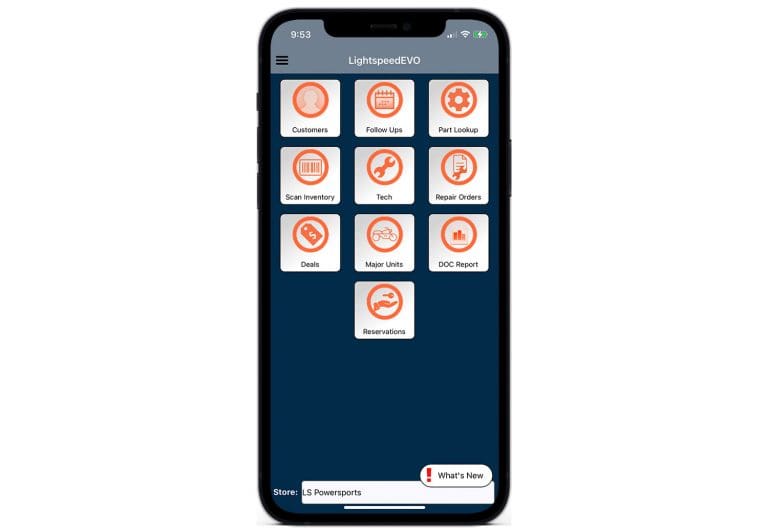
The modern dealership doesn’t run from behind a desk. With Lightspeed Mobile, your team can access the tools they need directly from their phone or tablet (works with iOS and Android devices), at no additional cost and with no user licenses required.
By meeting customers where they are, sales reps can answer questions on the spot, capture leads in real time, and even secure digital signatures without delay. Dealerships using Lightspeed Mobile report up to 18% faster close rates.

What You Can Do With Lightspeed Mobile
Service Check-In
Start repair orders from the parking lot, service lane, or customer site. Advisors can scan a driver’s license, add unit details, capture photos, add job notes, send estimates, and collect eSignatures. The app fully supports voice-to-text dictation. This allows service advisors to verbally describe issues and permits technicians to log notes without needing to type manually.
Technician Workflow
Technicians can view assigned jobs, clock into work, review repair order details, add internal notes, request parts, and capture photos or videos from the bay or field.
Customer Communication
Send texts and emails from dealership communication channels instead of personal phone numbers or personal email accounts. Messages, replies, and attachments can sync back into Lightspeed DMS for better team visibility.
Sales and CRM
Sales reps can access live unit inventory from the showroom, lot, event, or off-site location, including unit details, photos, specs, pricing, deals, follow-ups, and customer information. They can answer customer questions in the moment, create or update leads, send deal documents, and collect eSignatures from a phone or tablet.
Sales reps can also capture, track, and follow up on leads from a phone or tablet, with mobile lead activity syncing back to the DMS so opportunities stay visible and actionable.
Parts Lookup and Inventory
Parts teams can look up part numbers, descriptions, supplier codes, stock quantities, and recent parts activity from a mobile device. Mobile barcode scanning also supports physical inventory counts, helping teams check availability and keep inventory workflows connected to Lightspeed DMS.
Rental Workflows
Rental teams can view reservations, document unit condition with photos, send agreements or waivers, and collect signatures during delivery or return
Management Reporting
Authorized managers can view Daily Operating Control reporting from a mobile device to monitor dealership activity while away from the store.
Use it to:
- Monitor Daily Operating Control reporting.
- Review department performance.
- Check operational activity while away from the store.
- Maintain visibility across sales, service, parts, rental, and accounting workflows.
Role-based permissions help ensure users only see the areas they are approved to access.
Watch the Lightspeed DMS Mobile Webinar to learn how to do business from anywhere!
Why Lightspeed Mobile?
Our mobile app helps teams reduce paper handoffs, answer customer questions faster, document service work clearly, and keep mobile activity connected to the DMS.
Use it when your team needs to:
- Check in customers away from the service counter.
- Document unit condition with photos or videos.
- Send estimates, deal documents, rental forms, or waivers for eSignature.
- Look up inventory while standing with a customer.
- Give technicians access to assigned work from the bay.
- Keep customer communication visible inside Lightspeed DMS.
- Support off-site service, events, rentals, and field work.
Built for Dealership Teams
Designed for dealerships in:
Each industry benefits from mobile-optimized workflows that make it easier to serve customers on the spot.

Security, Permissions, and Compliance
Lightspeed Mobile uses the same permission logic that controls access in the desktop version of Lightspeed. If a user has access to parts, service, sales, rental, DOC reporting, or another area in the desktop system, mobile access follows those permissions.
Key controls include:
- Login required for mobile access
- Role-based permissions to control what mobile users can access
- Business-channel texting and email for customer communication
- eSignature support for signed documents
- TCPA- and CAN-SPAM-compliant communication tools
- Encrypted cloud hosting and data storage
- Secure digital signatures to protect sensitive transactions
- Cloud-only media storage to protect personal device capacity
Mobile FAQ's
What devices does Lightspeed Mobile support?
Lightspeed DMS Mobile works on both iOS and Android phones and tablets.
Do photos and videos taken in the app use up my phone's storage?
No. All images and videos captured through Lightspeed Mobile are uploaded and saved directly to the cloud and the secure Lightspeed server, meaning they will not consume data storage space or clutter your personal device.
Does it really come at no charge?
Yes. Lightspeed Mobile is included with your DMS subscription at no additional cost and does not require a per-user license. Furthermore, users can remain logged into the desktop application and the mobile app at the same time without exhausting active user licenses.
Can I complete transactions on mobile?
Yes. Sales reps can capture leads, send communications, and secure digital signatures directly from their device.
Can I edit part prices or bin locations directly on mobile?
Not at this time. While you can look up details and quantities, altering part numbers, pricing, or bin locations must be done on the desktop version. These features have been highly requested by dealers and are currently with our development team.
Does it work offline?
Lightspeed Mobile requires an internet connection for real-time data syncing. Limited offline functionality is available for certain tasks.
How secure is customer communication?
All data is encrypted, communications are TCPA- and CAN-SPAM-compliant, and managers can control user permissions.
Can managers track mobile activity?
Yes. All mobile actions: texts, emails, signatures, and lead updates, sync into Lightspeed DMS for full visibility.
Where can I download the app?
Lightspeed Mobile is available in both the Apple App Store and Google Play Store. To initiate your first login, you will need your specific server access information, which can be easily provided by your Lightspeed implementation specialist or our support team.
Do you provide training?
Yes. Onboarding includes mobile setup, and ongoing training resources are available for your team.
Learn More
For a deeper walkthrough of mobile workflows across service, sales, parts, rental, and accounting, watch the Lightspeed Mobile webinars:
4.5K+
40+
475+
Dealerships in North America
Years in Business
Integration Partners
Why Lightspeed?
Lightspeed DMS provides the foundational architecture your dealership needs to eliminate operational silos and reclaim lost revenue. By unifying sales, service, and accounting into one seamless system, we empower you to move faster, work smarter, and stay in total control of your growth.